Datum Machine
Laser cutting automation turns a precise beam into a more consistent production process. For manufacturers, the value is practical: fewer manual handoffs, steadier cut quality, and better use of machine time. A sheet enters the system; software nests the parts, the laser cuts them, and automated handling moves material onward. Less waiting. Fewer interruptions.
So, what are the benefits of laser cutting automation? The answer depends on the shop’s workload, material mix, and existing workflow. Automated loading and unloading can reduce repetitive handling, while programmed settings help operators repeat proven jobs. Nesting software can also limit scrap by arranging parts efficiently across a sheet. These gains are not automatic. Poorly planned workflows, maintenance gaps, or unsuitable equipment can erase them.
Dr. Reinhart Poprawe, a prominent laser-technology researcher and former head of Fraunhofer ILT, provides a useful expert perspective on connecting laser processes with industrial production. I could not verify a verbatim quotation from him on this exact topic, so the following is a paraphrase, not a direct quote: “Automation creates value when it makes a reliable process repeatable.” That distinction matters. A buyer should compare cycle times, material utilization, uptime, and labor demands using real production data. The right system may improve throughput without sacrificing accuracy, but results vary by application. This guide examines the benefits, limitations, and practical checks that help teams judge whether automation fits their operation.
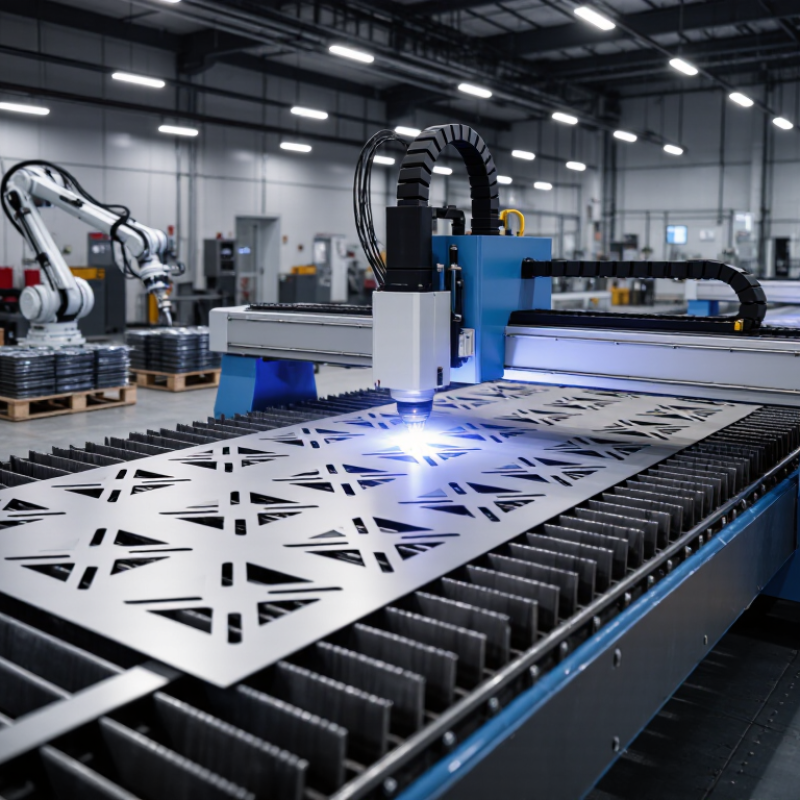
An automated laser cutting system turns a digital part drawing into a sequence of machine movements. Software converts the drawing into tool paths, while an operator checks material type, thickness, and required tolerances. A sheet is placed on the cutting bed, often against locating pins or a programmed stop. Small setup errors matter.
The machine’s control system moves the cutting head along the planned path. A focused laser heats a narrow area, while assist gas clears molten material from the cut. Sensors can monitor height and help keep the nozzle at a consistent distance from the sheet. The beam switches on and off as the head follows each contour, including holes and sharp corners.
After cutting, parts may be unloaded automatically or handled by an operator, depending on the system. Automation can reduce repetitive positioning and improve consistency across batches, but it does not remove the need for checks. Nozzle wear, dirty optics, or an unstable sheet can affect edge quality. A clean first cut is useful evidence, not a guarantee: operators still inspect dimensions, burrs, and heat marks, then adjust settings when results drift.
Laser cutting automation can shorten the time between sheets, not just the time spent cutting. An automated loader places metal sheets onto the bed while the machine prepares the next job. A conveyor or sorting system can move finished parts away without waiting for an operator to clear each piece. In a busy shop, those small pauses add up. They matter most when jobs repeat and material sizes are consistent.
Automation can also make production capacity more predictable. Nesting software groups parts to reduce sheet changes, while stored cutting settings help maintain steady results across shifts. Operators can spend more time checking first-piece quality, handling exceptions, and planning the next batch. Still, automation is not a cure for every bottleneck. A poorly planned queue can leave a fast cutter waiting for material, and sensors or handling equipment need routine checks. The gains may be smaller than expected at first. That deserves review.
Tips: Track cutting time, loading delays, and stoppages before and after installation. Keep common sheet sizes ready near the loader, and test a representative job before changing the full production schedule. A short trial often reveals details the initial plan missed.
How automation can increase cutting speed and production capacity
Illustrative model, not an industry benchmark: assuming a 10-part batch takes 12 minutes in a manual workflow and 8 minutes in an automated workflow, an uninterrupted 8-hour shift yields an estimated 400 versus 600 parts. Automation can raise capacity by reducing batch cycle time; actual results vary with the machine, material, part design, and downtime.
Automated laser cutting controls translate a digital toolpath into coordinated motion, laser power, and assist-gas settings. Repeatable commands help the cutting head follow the same contour throughout a production run. This reduces variation caused by manual adjustments. A small hole shows the benefit: steady motion and focus can keep its diameter and edge shape closer to specification. That matters.
Sensors and programmed routines can respond to changes in sheet position or cutting conditions. If a sheet shifts slightly, a registration system may correct the path before cutting begins. Operators can save material-specific settings and check them on test pieces instead of relying on guesswork. This makes setups easier to reproduce when jobs change. Still, software cannot make every sheet behave alike.
No system is flawless. Dust on a lens, a worn nozzle, material variation, or poor calibration can undermine precision. A clean-looking cut may still have a rough underside; the displayed settings alone may not reveal why. Regular inspections and sample cuts remain essential. Automation works best when it makes careful process control easier to repeat, not when it replaces operator judgment.
| Control Area | Less-Automated Workflow | Automated Control | How It Supports Precision and Consistency | Useful Measurement |
|---|---|---|---|---|
| Toolpath execution | The operator guides or sets cutting movements with more manual input. | A CNC controller follows a programmed path using machine motion systems. | Repeating the same programmed path reduces variation caused by manual movement. | Part-to-part dimensional variation; path or contour deviation, measured in millimeters. |
| Axis positioning | Positioning depends more heavily on setup, adjustment, and operator technique. | Servo drives and position feedback help the controller track commanded axis movement. | Feedback can identify and correct position error within the machine’s operating limits. | Positioning error and repeatability, measured according to the machine’s specification and test method. |
| Cutting-head height | Nozzle-to-material distance may require manual setting and checking. | Height sensing or automatic focus control can maintain a specified cutting-head position. | More consistent stand-off distance and focus help keep cutting conditions stable as the head follows the material surface. | Head-to-sheet distance or focus-position variation; record in millimeters where applicable. |
| Cutting parameters | Power, speed, and other settings may be adjusted manually for each job. | Stored programs apply defined parameters for a material, thickness, and process. | Using repeatable settings reduces unintended differences between runs; settings still need to suit the material and machine. | Programmed versus actual cutting speed and power; track parameter changes by job. |
| Piercing and lead-in | Pierce location, timing, or approach path may be set inconsistently. | The program controls pierce points, pierce timing, and lead-in or lead-out paths. | Consistent sequencing can reduce variation around starts, corners, and small features. | Edge quality at pierce points; burr, dross, or dimensional deviation recorded against the drawing. |
| Job changeover | Operators may need to re-enter or recheck settings during each setup. | Saved job programs can recall approved cutting paths and process settings. | Repeatable job setup can reduce data-entry differences and support consistent production across shifts. | Setup time and first-piece inspection results for each job changeover. |
| Process monitoring | Issues may be noticed only through periodic operator checks or final inspection. | Available sensors and alarms can flag selected process or machine conditions during cutting. | Earlier alerts can help operators investigate interruptions or changing conditions; monitoring does not guarantee a defect-free cut. | Alarm frequency, downtime, and rejected-part rate, tracked over a defined production period. |
| Quality verification | Results may be recorded inconsistently between operators or production runs. | Digital job records can be paired with inspection results and machine settings. | Traceable records make it easier to compare runs, identify variation, and adjust the process. | Drawing conformity, dimensional measurements, and scrap or rework rate. |
Note: Automation improves repeatability, but achievable accuracy depends on machine condition, calibration, material properties, cutting parameters, and inspection method. Verify performance against the equipment specification and part tolerances.
Laser cutting automation can reduce repetitive work around the machine. Operators spend less time manually loading sheets, starting each cut, and sorting finished parts. They can instead check programs, monitor cutting quality, and prepare the next job. That shift matters when orders contain many small components. A sheet can be loaded once, while automated sequencing cuts parts with fewer pauses. The labor savings depend on production volume and setup quality; automation does not remove the need for skilled oversight.
Tips: Check material thickness and sheet condition before running a program. Use nesting software to arrange parts closely, while leaving enough spacing for safe cutting. Review the first sheet before approving a long run.
Better nesting can reduce offcuts, especially when part shapes vary. Automated cutting may also limit errors caused by repeated manual handling. But a poor layout can waste material faster than a careful operator would. A rushed setup remains a rushed setup.
Keep records of scrap, rework, and loading time, then adjust the process based on actual results. It is worth asking whether every job needs full automation; for short runs, setup time can outweigh the savings.
Automation changes how operators interact with a laser cutting cell. Enclosed cutting areas, interlocked doors, and extraction systems can reduce exposure to beam hazards, sparks, and airborne particles. They do not remove every risk. Operators still need clear procedures, training, and routine checks of guards and filters. A blocked extraction duct, for example, can make a clean-looking process less safe. Not automatically.
The flexibility is practical, too. A programmed job can move from a thin stainless panel to a thicker sheet with adjusted parameters and a new cutting path. Automatic loading and unloading reduce repeated lifting, while sensors can pause movement if a sheet shifts or a door opens. It is easy to overestimate the first setup. Material variation, worn nozzles, or a poorly nested part can still cause scrap and delays. Teams should verify the first cut, record changes, and keep manual recovery steps clear. Keep the emergency stop within reach, and include restart procedures in operator training.
Software converts the digital drawing into tool paths. The control system guides the cutting head along each contour.
A focused beam heats a narrow area, while assist gas clears molten material. Sensors can help maintain the nozzle’s distance from the sheet.
Sheets may rest against locating pins or a programmed stop. Small setup errors matter.
No. Operators still check dimensions, burrs, and heat marks. A clean first cut helps, but it proves little about every later part.
An automated loader can place the next sheet while the machine prepares a job. Conveyors or sorting systems can move finished parts away. Small pauses add up.
Nesting software can reduce sheet changes, and stored settings can support consistent results across shifts. A fast cutter may still wait for material.
Worn nozzles, dirty optics, or an unstable sheet can affect the edge. Routine checks help, though settings may still need adjustment.
Track cutting time, loading delays, and stoppages before and after installation. Test a representative job first. The initial estimate may be optimistic.
Laser cutting automation combines computer-controlled equipment, programmed cutting paths, and material-handling systems to move jobs from design to finished parts with less manual intervention. What are the benefits of laser cutting automation? It can increase cutting speed and production capacity by keeping machines working efficiently and reducing delays between tasks. Automated controls also help maintain precise settings and repeatable results, making parts more consistent across production runs.
Automation can reduce routine labor needs and limit material waste through accurate cutting plans and better use of sheet materials. It can also support safer work by separating operators from some machine tasks and using monitoring systems to help manage the process. With programmable settings and quick changeovers, automated laser cutting systems can adapt to different designs and order sizes, giving manufacturers greater flexibility while improving productivity and resource use.